
About the Bareun distribution
You can install Bareun on your own PC or server and use it there.
Bareun can be operated in a wide range of environments.
It currently runs on Linux, macOS, and Windows.
The supported operating systems and platforms are:
- Linux, Intel-family 64-bit
- Linux, ARM 64-bit
- macOS, Intel-family 64-bit
- macOS, Apple silicon 64-bit
- Windows, Intel-family 64-bit
Bareun is not a library.
It is designed to run as a server and return results through an API. Why it runs as a server is a topic worth reading.
The server that runs Bareun is simple.
- It does not depend on other environments. It uses only the ONNX Runtime library.
- It does not depend on other libraries and runs on its own.
All of this is possible because Bareun is written in Go and uses only the ONNX Runtime library.
Go
Go, created by Google, supports nearly every execution environment. You can develop with Go without depending on many libraries, and it statically links each feature into a single executable.
ONNX
Bareun depends on the ONNX (Open Neural Network Exchange) Runtime library.
ONNX Runtime is an inference library for deep learning models, created by Microsoft.
The library ships with the distribution.
Note that it is loaded dynamically rather than bound at link time,
so you can also install it separately from Bareun.
You can install the morphological analyzer alone.
Bareun consists of two main parts: the morphological analyzer and the spell checker. The spell checking service is not available as an installable package.
Instead, you can access it as a free or paid service through https://bareun.ai/.
If you need a separate installation for commercial use, one can be arranged.
Four components
When you install Bareun, four main components are installed together.
Bareunruntime: theBareunexecutable and the ONNX Runtime library.Bareundeep learning model: a Transformer-based deep learning model trained with PyTorch that embodiesBareun's morphological analysis. The model is not in the installer. The server downloads it automatically on first run (see First run after installation).- Manual and administration features:
Bareunincludes the help needed to run it, and lets you make simple settings for running it. - Shared data for extending
Bareunin various ways:Bareunuses Protocol Buffers, FlatBuffers, and connectRPC. The related information is included.
The binary distributed as a Docker image provides additional features.
- Web-based morphological analysis: you can try and test morphological analysis on the web.
- Distributed environment for large-scale processing: provides a distributed environment for handling large volumes.
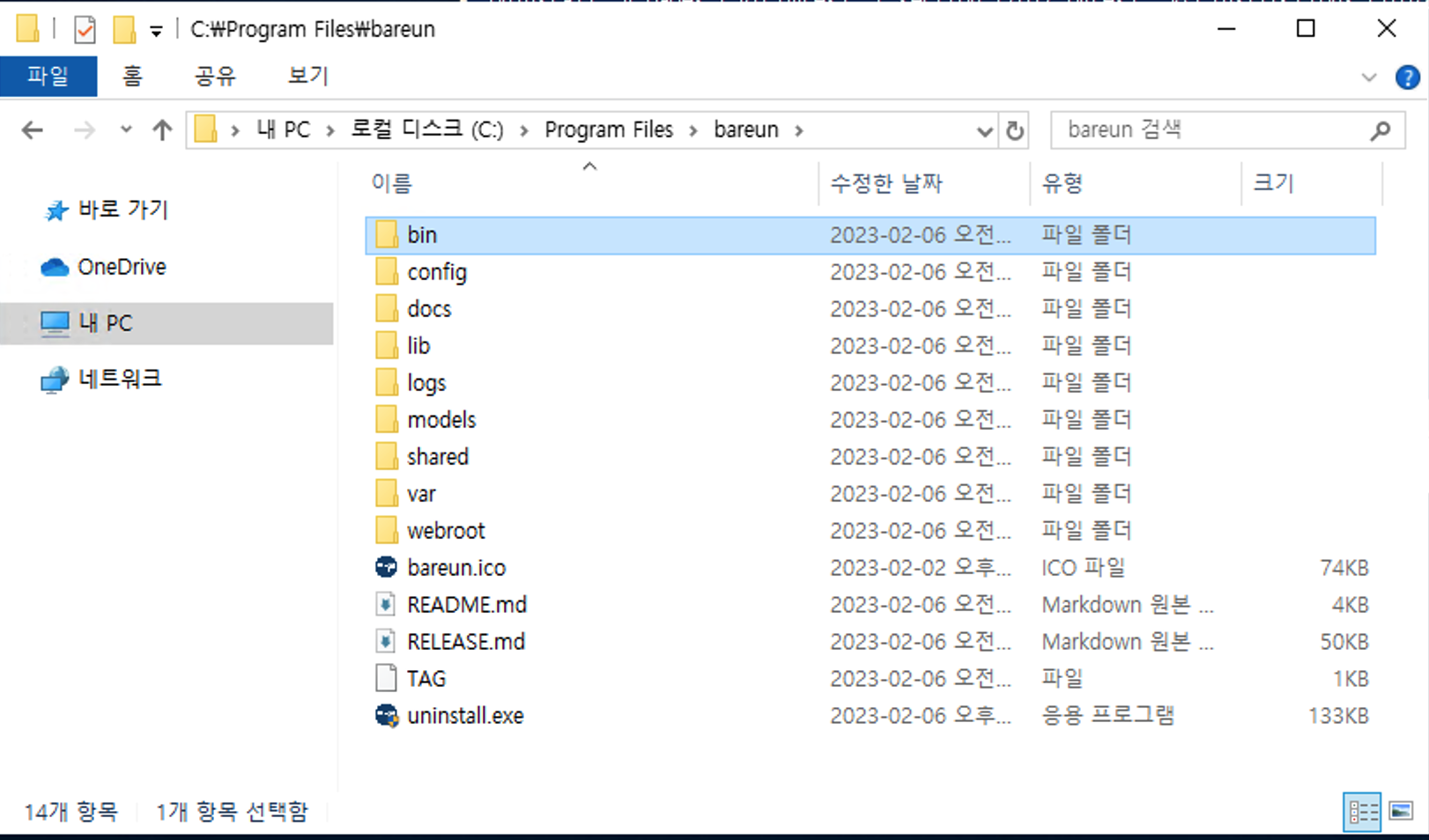
After you install Bareun, it consists of various directories, as shown in the figure below.
Installation methods
Bareun offers three installation methods.
- Install with Docker
- Automatic installation with a package
- Most Linux environments, such as Ubuntu, Red Hat, CentOS, and Mint
- Windows
- macOS
- Manual installation from an archive
- Linux
- Windows
- macOS
Install with Docker
docker pull bareunai/bareun:latest
Pull the Docker image as above, then run it with the command below.
mkdir -p ~/bareun/var

docker run \
   -d \
   --restart unless-stopped \
   --name bareun \
   -p 5656:5656 \
   -v ~/bareun/var:/bareun/var \
   bareunai/bareun:latest
Install with a package
When you install with a package, Bareun starts automatically as soon as installation finishes.
You don't need to reboot.
Linux installation
- First, download the installer. The installer has the .deb extension.
- Run the command below.
sudo apt install bareun-v3.4.0.linux-x86_64.deb
# or
sudo dpkg -i bareun-v3.4.0.linux-x86_64.deb
Unsupported Linux
We have confirmed that Bareun runs correctly on x86_64 machines with Red Hat 7.9, Red Hat 8, and Red Hat 9.
On older CentOS releases, some features did not work in some cases.
If you want to use it on this family of operating systems, please contact us (helpdesk@bareun.ai).
If you want to use it on an older Linux release that generally does not work, use a Docker environment.
Windows
- On Windows, download the installer and run it.
- For detailed installation instructions, see Windows installation details.
macOS
- On macOS, download the installer and run it.
- For detailed installation instructions, see macOS installation details.
Manual installation
- The Windows installer has the
.zipextension. - The Linux and Mac installers have the
.tar.gzextension.
Install from tar.gz
On Linux and macOS, we recommend extracting the archive into your home directory.
tar zxf bareun-v3.4.0.darwin-arm64.tar.gz -C $HOME
This creates a folder named bareun-v3.4.0.
Add the following line to the .bashrc file in your HOME directory.
export BAREUN_ROOT=$HOME/bareun-v3.4.0
To run it, use the following command.
nohup $BAREUN_ROOT/bin/bareun &
disown
Install from zip
- On Windows, extract the archive to a location of your choice.
- Set a system environment variable named
BAREUN_ROOTand point it to the installed folder. It is important not to include thebinfolder. - Press Windows + R and run
cmd.exe. - Then move to the install location and run
bin\bareun.exe.
First run after installation: automatic model download
Bareun does not bundle the models and dictionaries used for morphological analysis in the installer.
It downloads them automatically the first time the server runs. Because it picks the model that matches the installed product version, the installer stays small
and you don't need to reinstall when a new model is released.
| Item | Details |
|---|---|
| When | Once, the first time you start the server after installation (and again when you change models) |
| How much | Several hundred MB or more, depending on your network. We recommend at least 2 GB of free disk space |
| How long | Usually tens of seconds to a few minutes. The server does not accept analysis requests during this time |
| Where | Stored in the data area (var) of the install folder and reused as is from the next run |
Required connectivity
The first start needs an outbound HTTPS connection. If a firewall or proxy blocks external access, the server cannot download the model and startup stalls. To check, see When the model cannot be downloaded on first start.
If you use Docker
Mount the data area as a volume, as in -v ~/bareun/var:/bareun/var. The downloaded model is also stored in this
area, so without the mount you would download several hundred MB again every time you recreate the container.
For installation in a closed network with no internet access, and for how to switch to a new model later, see Model update.
Summary
Bareunis easy to install. Just download it and extract the archive.- For manual installation, you must set the install location in
BAREUN_ROOT. Bareunruns as a server and uses one TCP port.- 5656: provides all supported services.
- Runs morphological analysis, word splitting, the custom dictionary service, and the spell checking service.
- Performs general administration functions.
- Shows the documentation.
Library path
Easy setup on Linux or macOS
Bareun includes the ONNX Runtime library, which it uses for deep learning model inference.
These files are in the $BAREUN_ROOT/lib directory.
Bareun works correctly only if you specify the path to these files.
The easiest way is to use an environment variable.
Put the line above in your .bashrc.
Make it known system-wide
Alternatively, you can make the path above known to the whole system.
Create a new file in the /etc/ld.so.conf.d folder and put the path there for the system to read.
Create a bareun-tf.conf file in this folder and put the following in it.
/home/username/bareun-v3.4.0/lib
The current version uses ONNX Runtime library 1.29.0.
On Windows
On Windows, the file is onnxruntime.dll.
In a Windows environment, onnxruntime.dll is in the lib directory.
Service port
Because Bareun runs as a server, it works without trouble in any TCP/IP network environment.
An internal network connection is enough for the analysis service itself, but it needs one outbound
connection the first time it runs, to download the model (see First run after installation).
The default service port is 5656. You can change it in the settings.
Bareun service
: The connectRPC port.
Through this port you get the language analysis service and the custom dictionary service, as well as Bareun spell checking.
- The language analysis service mainly covers morphological analysis and word splitting.
- The custom dictionary service lets you list custom dictionaries, retrieve their contents,
update them, and delete them.
- The Bareun spell checking service performs the corrections.
You can reach this port over HTTP/1.1, HTTP/2, and others.
Administration
: Uses HTTP/1.1.
Bareun has a built-in web server.
First, it provides a basic REST API service.
For details on the REST API, see REST API.
Bareun also shows the documentation by default.
It also provides user management features.
- View installation information
- Register and unregister API keys
- View the users currently connected